Minimal, mobile-first task manager for quick daily planning
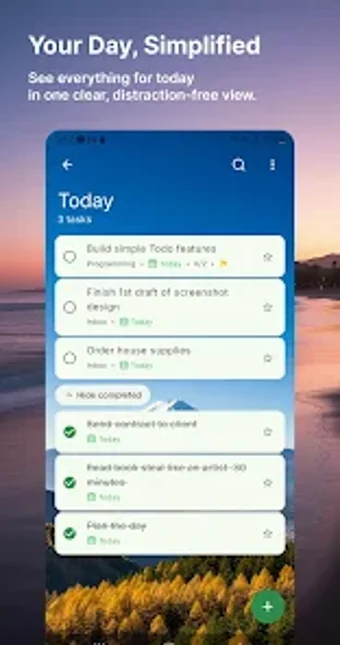
FreshDo - To Do List Tasks, from Paraga Mobile, is a minimalist Android task manager for daily planning. It focuses on quick task capture, folders for project grouping, priority flags, subtasks, recurring tasks, dark mode, and custom reminders with push notifications to keep deadlines visible. Built for simplicity, the app emphasizes a clutter-free interface, one-handed navigation, and lightweight performance across smartphones and tablets, with focus on core productivity essentials rather than enterprise bloat. Suited to students and busy professionals who prefer a low-friction planner instead of feature-heavy project suites.
What is FreshDo used for?
FreshDo functions as a compact digital planner for capturing ideas and organising short-term work without full project management complexity. The design keeps visual elements to a minimum so users concentrate on immediate priorities and simple schedules. That orientation fits workflows where fast entry and clarity are more important than multi-user orchestration or advanced reporting, making it appropriate for personal task lists and solo professional tasks.
What can you accomplish with the app in a typical workflow?
The app structures everyday work into practical components so tasks move from capture to completion with minimal steps. Common operations include:
quick-add entry for immediate task capture
folders and categories for project segmentation
subtasks to break larger items into steps
priority levels and recurring items for routine work
Is FreshDo easy to adopt for non-specialist users?
Onboarding is intentionally light, relying on a clutter-free layout and one-handed navigation to reduce learning friction. The interface avoids complex menus, so users do not need specialist training to start building lists and checklists. This makes it suitable for students and solo professionals who prefer a straightforward planner rather than extensive configuration or steep feature learning curves.
How does FreshDo perform on Android devices and in daily use?
Performance is oriented toward modest resource use, with the developer optimising the app to run smoothly across a broad range of smartphones and tablets. User feedback highlights the app's aesthetic clarity and dependable behaviour in daily routines, which supports habit tracking and frequent task updates. The focus on core functions keeps runtime and memory demands lower than typical feature-heavy alternatives.
FreshDo is a practical choice for individuals needing a low-friction task manager
FreshDo suits students and busy professionals who need straightforward daily planning and quick capture. The trade-off is reduced depth compared with complex project managers, so teams requiring advanced scheduling, reporting, or integrations may find it limiting. Use it as a daily planner rather than a substitute for enterprise workflow software.
Pros
Quick-add task entry reduces friction capturing new items
Subtask support breaks projects into manageable steps
Dark mode and lightweight design suit extended mobile use
Cons
Less suitable for enterprise-grade project planning and reporting
Limited feature depth compared with complex project management suites
Not focused on social or enterprise features, so collaboration is limited
Laws concerning the use of this software vary from country to country. We do not encourage or condone the use of this program if it is in violation of these laws. Softonic may receive a referral fee if you click or buy any of the products featured here.